💡 Quick Answer
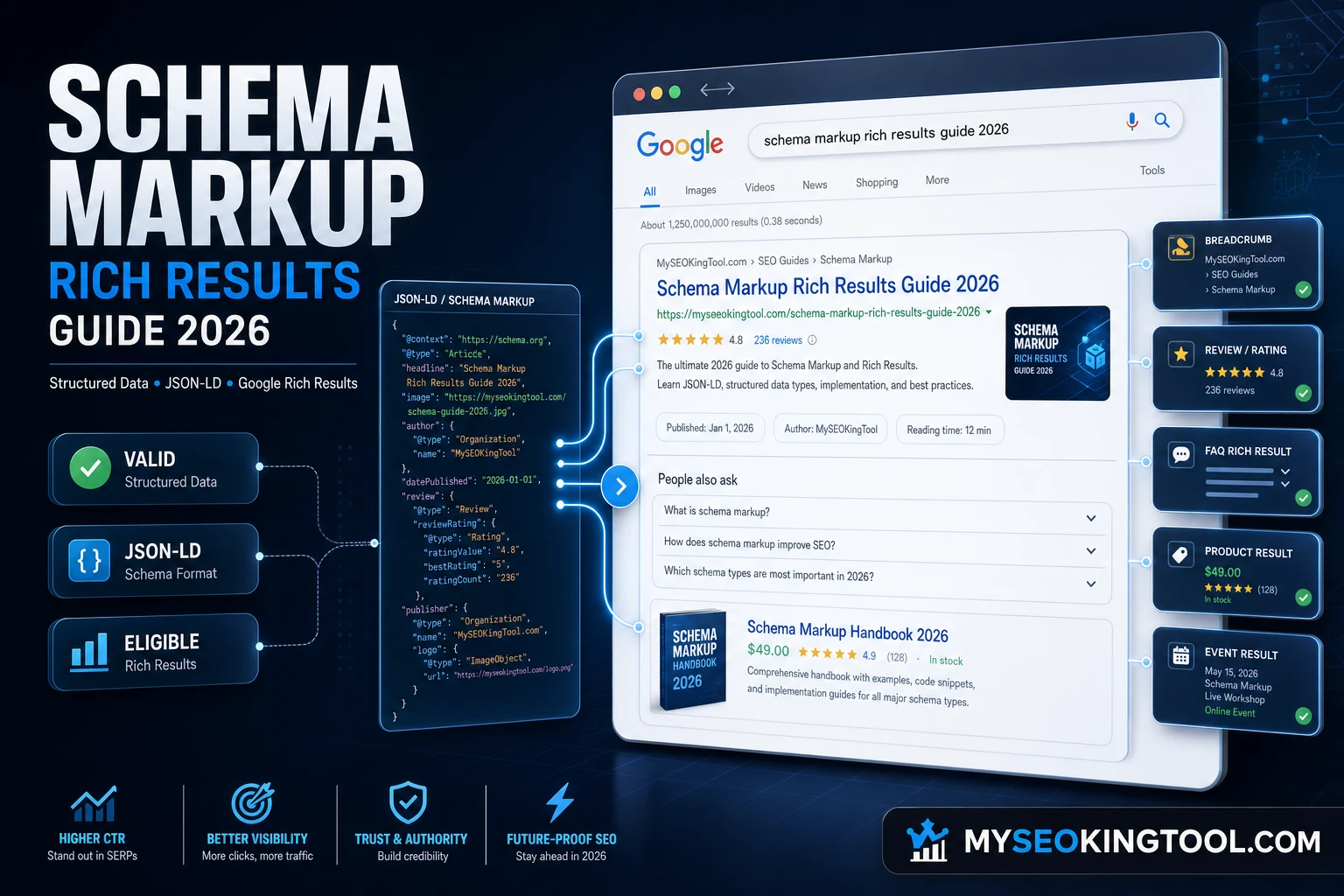
Schema markup is structured data code added to your HTML that helps Google understand your content. Rich results are the enhanced search listings — with star ratings, images, FAQs, and prices — that Google displays when it reads valid structured data on your page. Together, they can boost your click-through rate (CTR) by up to 30%.
If you have ever searched on Google and seen a result with star ratings, expandable FAQs, or product prices — you have already seen schema markup rich results in action. These enhanced search listings are not random. They are the direct result of websites implementing structured data correctly.
In 2026, with Google's AI Overviews, voice search, and increasingly visual SERPs, understanding schema markup and how it generates rich results is one of the highest-impact SEO strategies available — and it starts with knowing how to use the Google Rich Results Test and Schema Markup Validator.
📑 Table of Contents
- What Is Schema Markup?
- What Are Rich Results?
- How Schema and Rich Results Work
- Google Rich Results Test: How the Test Works
- Schema Markup Validator vs Rich Results Test
- Schema Markup Guide 2026: Boost CTR by 30%
- Types of Schema Markup Google Supports
- Schema Markup Examples (JSON-LD)
- Best Schema Markup Generators
- Schema Markup in AI Search 2026
- Does Schema Markup Help SEO?
- Step-by-Step Implementation Guide
- FAQ: Schema Markup Rich Results
What Is Schema Markup?
Schema markup (also called structured data) is a standardized code vocabulary — defined at Schema.org — that you add to your HTML to help search engines understand the meaning and context of your content. It was created as a joint initiative by Google, Bing, Yahoo, and Yandex.
Think of schema markup as a translator between your content and search engines. Without it, Google reads your page and tries to guess what it's about. With schema markup, you explicitly tell Google:
- This page is an Article written by a specific author
- This page contains FAQs with questions and answers
- This page describes a Product with a price and rating
- This page is a Recipe with cooking time and calories
- This page lists Events with dates and locations
"Schema is a shared language created by several big search engines, containing a standard markup for structured data these search engines are able to understand." — Yoast
Schema Markup Formats
Google supports three formats for schema markup implementation:
-
JSON-LD ⭐ — JavaScript notation placed in a
<script>tag. Google's recommended format. Easiest to implement and maintain. - Microdata — HTML attributes added directly to your page elements. More complex but widely supported.
- RDFa — An HTML5 extension for structured data. Primarily used in academic and government contexts.
🔑 Key Takeaway
Always use JSON-LD format for your schema markup.
It's the easiest to implement and update, and is officially
recommended by Google. Place it in the
<head> section inside a
<script type="application/ld+json"> tag.
What Are Rich Results?
Rich results are experiences on Google surfaces — such as Search — that go beyond the standard blue link. According to Google's own definition: "Rich results can include carousels, images, or other non-textual elements." They are also commonly referred to as rich snippets.
A rich result is an enhanced search result shown on the search engine results page (SERP) that makes your listing more visually prominent, more informative, and more clickable than a standard result.
Rich Results Examples
- FAQ Rich Results — expandable Q&A directly in SERP
- How-To Rich Results — step-by-step guides with images
- Recipe Rich Results — photos, ratings, cook time, calories
- Product Rich Results — price, availability, star ratings
- Article Rich Results — top stories carousel with images
- Video Rich Results — thumbnails and duration in results
- Event Rich Results — dates, locations, ticket info
- Review Rich Results — star ratings and review counts
How Schema and Rich Results Work
Understanding the relationship between schema markup and rich results is fundamental to any structured data strategy. Here's the complete flow from code to SERP:
- You add schema markup to your page — implement JSON-LD structured data in your HTML, defining entities, types, and properties using Schema.org vocabulary.
- Googlebot crawls and reads your markup — Google's crawler discovers and reads your structured data, validating it against Schema.org specifications and Google's guidelines.
- Google processes and indexes structured data — valid schema is processed and stored. Google connects your structured data to its Knowledge Graph.
- Google decides on rich result eligibility — having valid schema markup makes your page eligible for rich results, but does not guarantee them.
- Rich results appear in Google Search — when a user searches a relevant query, Google displays your enhanced listing with star ratings, FAQs, images, or other visual elements.
⚠️ Important Distinction
Schema markup ≠ Rich results. Schema markup is the code you add. Rich results are what Google may display as a result. Valid schema makes you eligible — Google decides whether to show them based on content quality, query relevance, and compliance with its guidelines.
Google Rich Results Test: How the Test Works
The Google Rich Results Test is a free official tool that lets you test and validate your structured data to see which rich results your page is eligible for. It is part of Google Search Console's ecosystem of developer tools and is the most important tool in any schema markup workflow.
How to Use the Rich Results Test
- Go to the tool — navigate to search.google.com/test/rich-results. No login required for basic testing.
- Enter URL or paste code — test a live URL to check a published page, or paste your HTML/JSON-LD code directly to test before publishing.
- Review detected schema types — the tool shows all schema types detected, which rich result types you qualify for, and a preview of how your result may appear in search.
- Fix errors and warnings — Errors (red) must be fixed as they prevent rich results. Warnings (orange) are recommended fixes that improve eligibility.
- Re-test after changes — after fixing issues, re-run the test to confirm your structured data is valid.
- Monitor in Search Console — track rich result performance in Google Search Console under the Enhancements section.
💡 Pro Tip
Use the Code Snippet testing mode during development. This lets you test and validate your schema markup before deploying to production, saving you from publishing broken structured data that could take days for Google to re-crawl.
Schema Markup Validator vs Rich Results Test
Many SEOs confuse the Schema Markup Validator and the Google Rich Results Test. While both tools test structured data, they serve different purposes:
- Schema Markup Validator (validator.schema.org) — generic syntax validation for all Schema.org types. Does not show rich result eligibility or SERP previews. Best for catching syntax errors across all schema types.
- Google Rich Results Test (search.google.com/test/rich-results) — Google-specific validation showing which rich result types your page qualifies for, with a visual SERP preview. Only covers Google-supported schema types.
Best practice: Use both tools. Start with the Schema Markup Validator to catch syntax errors, then use the Google Rich Results Test to confirm rich result eligibility and preview your SERP appearance.
Schema Markup Guide 2026: Get Rich Results and Boost CTR by 30%
The data is clear: pages that appear as rich results in Google Search consistently outperform standard blue links. Studies show that rich results can boost CTR by 20–30% compared to standard results, with some schema types performing even better.
Why Rich Results Boost CTR
- Visual prominence — rich results take up more SERP real estate
- Trust signals — star ratings and review counts build instant credibility
- More information — users see what they need before clicking
- Lower bounce rate — users arrive knowing what to expect
- Competitive advantage — stand out among competitors without rich results
2026 Schema Markup Priorities
These schema types deliver the highest SEO and CTR impact in 2026:
- FAQPage — powerful for informational content, targets People Also Ask boxes
- HowTo — excellent for tutorial and guide content
- Product — essential for e-commerce pages with price, availability, and ratings
- Article — required for Google News and Top Stories carousel
- Organization — critical for brand entity and Knowledge Panel eligibility
- Review / AggregateRating — star ratings are among the highest CTR-boosting schema types
Types of Schema Markup Google Supports
Google supports over 36 structured data types that can generate rich results. Here are the most impactful types in 2026:
- FAQPage — expandable Q&A in search results
- HowTo — step-by-step instructions with images and duration
- Product — price, availability, ratings for e-commerce
- Article / NewsArticle / BlogPosting — for editorial content and Google News
- Review / AggregateRating — star ratings for products, services, and places
- Recipe — image, rating, cook time, calories for food content
- Organization — brand entity definition for Knowledge Panels
- LocalBusiness — business hours, address, phone, ratings for local SEO
- VideoObject — thumbnails and duration for video content
- Event — date, location, and ticket information
- JobPosting — salary, location, and company info
- Course — course details and provider information
- BreadcrumbList — site hierarchy navigation
- SoftwareApplication — app ratings, OS, and pricing
Schema Markup Examples (JSON-LD)
Here are practical schema markup examples in JSON-LD format — the format Google recommends.
FAQPage Schema Markup Example
<script type="application/ld+json">
{
  "@context": "https://schema.org",
  "@type": "FAQPage",
  "mainEntity": [
    {
      "@type": "Question",
      "name": "What is schema markup?",
      "acceptedAnswer": {
        "@type": "Answer",
        "text": "Schema markup is structured data code
        that helps search engines understand your content
        and display rich results in search."
      }
    }
  ]
}
</script>
Article Schema Markup Example
<script type="application/ld+json">
{
  "@context": "https://schema.org",
  "@type": "Article",
  "headline": "What is Schema Markup Rich Results?",
  "author": {
    "@type": "Organization",
    "name": "MySEOKingTool"
  },
  "datePublished": "2026-08-04",
  "image": "https://myseokingtool.com/assets/images/
             schema-markup-rich-results-2026.jpg"
}
</script>
Product Schema Markup Example
<script type="application/ld+json">
{
  "@context": "https://schema.org",
  "@type": "Product",
  "name": "MySEOKingTool Pro",
  "aggregateRating": {
    "@type": "AggregateRating",
    "ratingValue": "4.9",
    "reviewCount": "1247"
  },
  "offers": {
    "@type": "Offer",
    "price": "29.00",
    "priceCurrency": "USD",
    "availability": "https://schema.org/InStock"
  }
}
</script>
Best Schema Markup Generators in 2026
A schema markup generator allows you to create valid JSON-LD structured data without writing code manually. Here are the best options in 2026:
- MySEOKingTool Schema Builder (Free) — AI-powered generator supporting all major types: Article, FAQ, HowTo, Product, LocalBusiness, and more. Validates automatically.
- Google Structured Data Markup Helper — official Google tool for highlighting page content and generating schema. Good for beginners.
- Merkle Schema Markup Generator — free tool supporting a wide range of schema types with a user-friendly interface.
- Schema.org Official Documentation — authoritative reference for all schema types and properties. Essential for advanced implementation.
When evaluating knowledge graph SEO software and schema markup services, look for tools that offer entity extraction, relationship mapping, schema generation, and competitive analysis.
Schema Markup in AI Search 2026
Schema markup in AI search is more important than ever in 2026. As Google's AI Overviews, Bing Copilot, and other AI-powered search experiences become mainstream, structured data serves a critical new role.
How AI Search Uses Schema Markup
- Entity extraction — AI systems use structured data to identify entities and their attributes quickly and accurately
- Content citation — AI Overviews cite pages with clear structured data more frequently
- Attribute understanding — product prices, ratings, dates, and structured properties feed directly into AI-generated answers
- Voice search — structured data helps voice assistants extract and speak accurate answers
- Multimodal search — image and video schema connects visual content to AI search understanding
"Schema markup is an essential tool for improving search visibility, especially in a landscape where AI-driven search, voice assistants, and rich snippets dominate the results page." — KarmaJack
🚀 AI Search Strategy
To maximize visibility in AI-powered search results, implement Organization, Article, and FAQPage schema on every relevant page. These three schema types give AI systems the clearest signals about who you are, what your content is about, and what questions it answers.
Does Schema Markup Help SEO?
This is one of the most debated questions in the SEO community. The answer is: yes, but not in the way most people think.
What Schema Markup Directly Does for SEO
- ✅ Enables rich results — making your listing more visually prominent in SERPs
- ✅ Boosts CTR — rich results consistently outperform standard links by 20–30%
- ✅ Improves entity understanding — helps Google correctly categorize your content in its Knowledge Graph
- ✅ Supports Knowledge Graph integration — strengthens brand entity signals
- ✅ Enhances AI search visibility — structured data feeds AI-generated answers in Overviews
What Schema Markup Indirectly Does
- 📈 Improves rankings indirectly — higher CTR signals relevance to Google, which can improve rankings over time
- 📈 Reduces bounce rate — users who see rich results know what to expect, leading to better engagement metrics
- 📈 Builds trust signals — star ratings and review counts increase perceived authority and brand credibility
Step-by-Step Schema Markup Implementation Guide
Here is your complete action plan for implementing schema markup and earning rich results on your website:
- Identify relevant schema types — review Google's Structured Data Gallery and match schema type to your content type.
- Generate your schema markup — use MySEOKingTool's Schema Builder or another schema markup generator to create valid JSON-LD with all required and recommended properties.
- Validate with Schema Markup Validator — go to validator.schema.org and paste your JSON-LD to catch syntax errors before adding to your page.
- Test with Google Rich Results Test — confirm rich result eligibility and preview how your result will appear in search. Fix any errors flagged.
-
Add schema to your page — place the JSON-LD
script block inside the
<head>section of your HTML and deploy to your live website. - Request indexing in Search Console — submit your URL for re-indexing using the URL Inspection tool to speed up Google's re-crawl.
- Monitor rich results performance — check Google Search Console's Enhancements section for rich result reports and track CTR improvements in the Performance report.
- Expand schema across your site — roll out appropriate schema to all relevant pages, prioritizing high-traffic pages first.
FAQ: Schema Markup Rich Results Questions
What does schema rich mean?
Schema rich refers to content that uses Schema.org structured data markup to qualify for rich results in Google Search. When your page has valid schema markup, Google can display enhanced search results with star ratings, images, FAQs, prices, and more beyond the standard blue link.
What is a rich result?
A rich result is an enhanced search result shown on Google's SERP that goes beyond the standard blue link. Rich results can include carousels, images, star ratings, FAQs, how-to steps, product prices, event details, and more. They are powered by structured data implemented on your webpage.
How do I test my schema markup?
Test your schema markup using Google's Rich Results Test at search.google.com/test/rich-results. Enter your page URL or paste your code directly. The tool shows which rich results your page is eligible for, along with any errors or warnings. Also use the Schema Markup Validator at validator.schema.org for syntax validation.
Do rich results display as schema?
Rich results are powered by schema markup, but they are not the same thing. Schema markup is the code you add to your HTML. Rich results are what Google displays when it reads and validates that markup. Not all schema markup guarantees rich results — Google determines eligibility based on content quality and relevance.
Does schema markup help SEO?
Yes, schema markup helps SEO significantly. While it may not directly boost rankings, it enables rich results that boost CTR by up to 30%. Higher CTR signals relevance to Google, which indirectly improves rankings. Schema also improves entity understanding, Knowledge Graph integration, and visibility in AI-powered search results — all critical for SEO in 2026.
What is the best schema markup generator?
The best schema markup generators in 2026 include MySEOKingTool's Schema Builder (free, AI-powered), Google's Structured Data Markup Helper, Schema.org's official documentation, and Merkle's Schema Markup Generator. MySEOKingTool generates valid JSON-LD for all major types including Article, FAQ, HowTo, Product, and LocalBusiness.
What are the types of schema markup?
The main types of schema markup supported by Google include: Article, FAQPage, HowTo, Product, LocalBusiness, Organization, Person, Event, Recipe, Review, BreadcrumbList, VideoObject, JobPosting, Course, SoftwareApplication, and many more. Each type enables different rich result formats in Google Search.
What is the difference between schema markup and rich snippets?
Schema markup is the structured data code you add to your webpage. Rich snippets (now called rich results) are the enhanced visual displays in search results generated from that markup. Schema markup is the cause; rich results are the effect.
Is schema markup in HTML?
Yes, schema markup is implemented in HTML. The
recommended format is JSON-LD, placed inside a
<script type="application/ld+json"> tag in your
page's <head> section. Google recommends JSON-LD
as it's the easiest to implement and maintain.
Is FAQ good for SEO?
Yes, FAQ schema is excellent for SEO. FAQ pages with FAQPage schema markup can appear as rich results in Google Search, showing expandable questions and answers directly in the SERP. This increases your visual footprint, boosts CTR, targets People Also Ask boxes, and helps your content appear in voice search and AI-powered search answers.
What is schema markup in AI search?
In AI search (like Google's AI Overviews), schema markup helps AI systems understand and extract information from your content more accurately. Structured data provides explicit signals about entities, their attributes, and relationships, making it easier for AI search engines to cite your content in generated answers.
How to check FAQ schema?
To check your FAQ schema: use Google's Rich Results Test at search.google.com/test/rich-results, enter your URL or code, and look for 'FAQPage' in the detected schema types. Also use the Schema Markup Validator at validator.schema.org for syntax validation, and monitor FAQ rich results in Google Search Console under the Enhancements section.
Is schema markup still relevant in 2026?
Absolutely. Schema markup is more relevant than ever in 2026. With Google's AI Overviews, voice search, and AI-powered search experiences, structured data helps search engines extract and present your information accurately. Schema markup is essential for rich results eligibility, knowledge graph integration, and visibility in AI search answers.
Generate Schema Markup Free with MySEOKingTool
Create valid JSON-LD schema for any page type in seconds. Test with Google Rich Results Test and boost your CTR by up to 30%.
Generate Schema Markup Free 🚀